> ## Documentation Index
> Fetch the complete documentation index at: https://docs.echo.xyz/llms.txt
> Use this file to discover all available pages before exploring further.
# Technical Overview
> How users participate in a Sonar-powered token sale
## Architecture
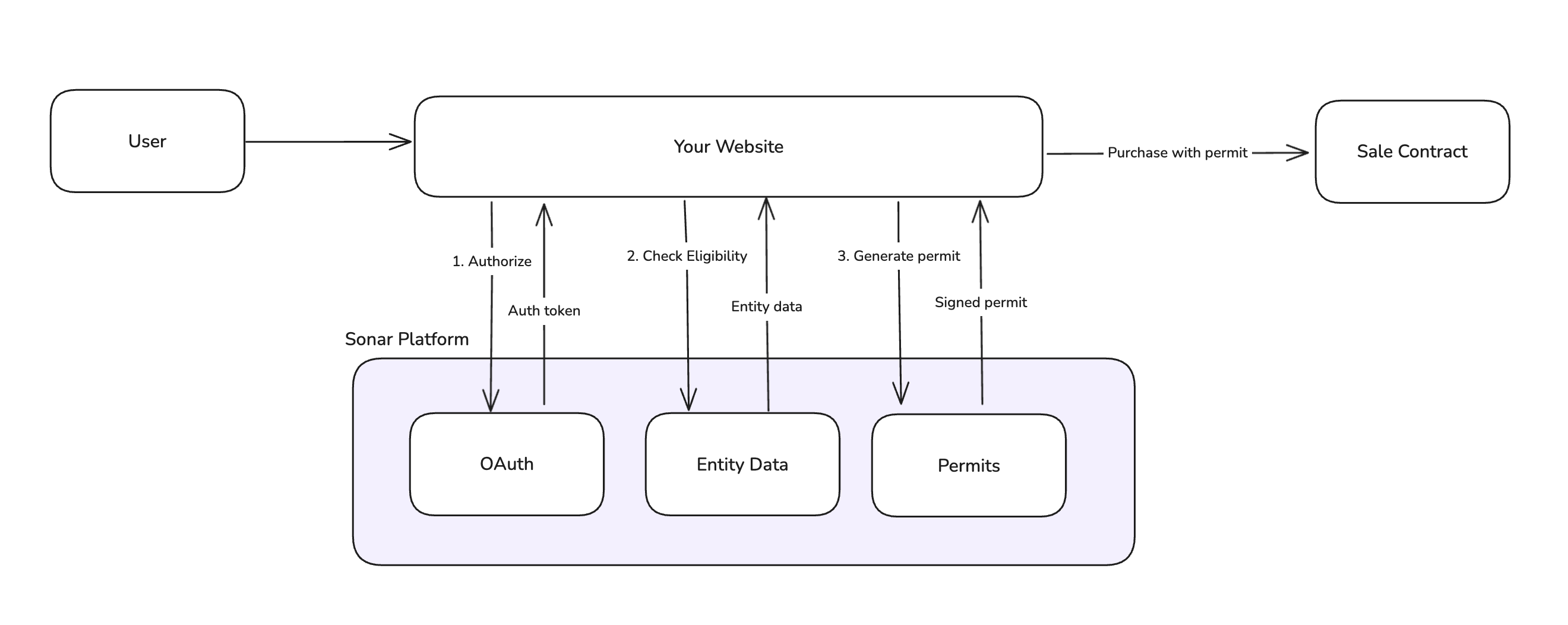 Sonar sits between your frontend application and your on-chain sale contract, handling compliance verification and authorization. Your project always owns the contract — Sonar never holds administrative keys.
***
## Onboarding and Purchase Flow
This is the end-to-end flow for a user participating in a token sale.
```mermaid theme={null}
flowchart TD
A[User arrives at sale page] --> B[Connect wallet & sign in with Sonar]
B --> C{Entity linked & setup complete?}
C -->|No| D[Redirect to Sonar platform]
D --> E[Complete onboarding on Sonar]
E --> F[Return to sale page]
F --> C
C -->|Yes| G{Eligible for this sale?}
G -->|No| H[Show ineligibility reason]
G -->|Yes| I[Generate purchase permit]
I --> J[Submit transaction to contract]
J --> K[Commitment confirmed]
```
### 1. User Arrives at Sale Page
The user lands on your sale page. Display sale information (timing, pricing, terms) and prompt them to connect.
### 2. Connect Wallet and Sign In with Sonar
The user connects their wallet and authenticates with Sonar via OAuth. These can happen in either order.
* **Wallet connection**: Use a standard wallet library (wagmi, ethers, etc.)
* **Sonar authentication**: [OAuth 2.0 PKCE flow](/sonar/core-features/authentication) redirects to Sonar, then back to your site
### 3. Check Entity Status
Once authenticated, your application queries Sonar's API to check:
* Which entities are linked to the authenticated user
* Whether each entity's `EntitySetupState` is `complete`
If no entity is found or setup is incomplete, redirect the user to complete onboarding:
```
https://app.echo.xyz/sonar/{saleUUID}/home
```
See [Entity Setup States](/sonar/core-features/entities#entity-setup-states) for all possible states and what they mean.
### 4. Complete Onboarding on Sonar
Users complete their verification on the Sonar platform. This includes:
* KYC (individuals) or KYB (organizations) verification
* Accreditation verification (if required by the sale)
The specific requirements are configured in the [Echo Founder Dashboard](https://app.echo.xyz/founder) based on your sale's compliance needs. Once complete, the user returns to your sale page.
### 5. Verify Eligibility
With onboarding complete, check that the entity meets this sale's specific requirements (jurisdiction, accreditation level, etc.). The entity's eligibility status is returned when you fetch entity state.
If not eligible, display a message explaining they don't meet the sale requirements. See [Sale-Specific Eligibility](/sonar/core-features/entities#sale-specific-eligibility) for details on each state, and the [frontend integration guide](/sonar/integration-guides/frontend-overview) for implementation examples.
If the entity is eligible, run a [pre-purchase check](/sonar/integration-guides/frontend-only#running-pre-purchase-checks) before generating a permit. This validates that the entity is ready to purchase (e.g. checking if a liveness verification is required).
### 6. Commit Funds
When the user is ready to purchase:
1. **Generate a [purchase permit](/sonar/core-features/purchase-permits)** from Sonar's API. The permit is a signed authorization containing purchase limits, price bounds, and expiration.
2. **Submit the transaction** to the sale contract with the permit and signature. See the [SettlementSale contract](/sonar/reference/contracts/settlement-sale) for a reference to our standard sale contract.
3. **Contract validates** the permit signature and records the commitment.
## Next steps
Get started with code examples for different frontend architectures
Sonar sits between your frontend application and your on-chain sale contract, handling compliance verification and authorization. Your project always owns the contract — Sonar never holds administrative keys.
***
## Onboarding and Purchase Flow
This is the end-to-end flow for a user participating in a token sale.
```mermaid theme={null}
flowchart TD
A[User arrives at sale page] --> B[Connect wallet & sign in with Sonar]
B --> C{Entity linked & setup complete?}
C -->|No| D[Redirect to Sonar platform]
D --> E[Complete onboarding on Sonar]
E --> F[Return to sale page]
F --> C
C -->|Yes| G{Eligible for this sale?}
G -->|No| H[Show ineligibility reason]
G -->|Yes| I[Generate purchase permit]
I --> J[Submit transaction to contract]
J --> K[Commitment confirmed]
```
### 1. User Arrives at Sale Page
The user lands on your sale page. Display sale information (timing, pricing, terms) and prompt them to connect.
### 2. Connect Wallet and Sign In with Sonar
The user connects their wallet and authenticates with Sonar via OAuth. These can happen in either order.
* **Wallet connection**: Use a standard wallet library (wagmi, ethers, etc.)
* **Sonar authentication**: [OAuth 2.0 PKCE flow](/sonar/core-features/authentication) redirects to Sonar, then back to your site
### 3. Check Entity Status
Once authenticated, your application queries Sonar's API to check:
* Which entities are linked to the authenticated user
* Whether each entity's `EntitySetupState` is `complete`
If no entity is found or setup is incomplete, redirect the user to complete onboarding:
```
https://app.echo.xyz/sonar/{saleUUID}/home
```
See [Entity Setup States](/sonar/core-features/entities#entity-setup-states) for all possible states and what they mean.
### 4. Complete Onboarding on Sonar
Users complete their verification on the Sonar platform. This includes:
* KYC (individuals) or KYB (organizations) verification
* Accreditation verification (if required by the sale)
The specific requirements are configured in the [Echo Founder Dashboard](https://app.echo.xyz/founder) based on your sale's compliance needs. Once complete, the user returns to your sale page.
### 5. Verify Eligibility
With onboarding complete, check that the entity meets this sale's specific requirements (jurisdiction, accreditation level, etc.). The entity's eligibility status is returned when you fetch entity state.
If not eligible, display a message explaining they don't meet the sale requirements. See [Sale-Specific Eligibility](/sonar/core-features/entities#sale-specific-eligibility) for details on each state, and the [frontend integration guide](/sonar/integration-guides/frontend-overview) for implementation examples.
If the entity is eligible, run a [pre-purchase check](/sonar/integration-guides/frontend-only#running-pre-purchase-checks) before generating a permit. This validates that the entity is ready to purchase (e.g. checking if a liveness verification is required).
### 6. Commit Funds
When the user is ready to purchase:
1. **Generate a [purchase permit](/sonar/core-features/purchase-permits)** from Sonar's API. The permit is a signed authorization containing purchase limits, price bounds, and expiration.
2. **Submit the transaction** to the sale contract with the permit and signature. See the [SettlementSale contract](/sonar/reference/contracts/settlement-sale) for a reference to our standard sale contract.
3. **Contract validates** the permit signature and records the commitment.
## Next steps
Get started with code examples for different frontend architectures